-
How to get Flash2X Flash Hunter button on Internet Explorer toolbar?
If you do not see Flash2X Flash Hunter button on your Internet Explorer toolbar after installing the program, please right click on your IE toolbar and select Customize Command Bar -> Add or Remove Commands as the following screenshot shows.
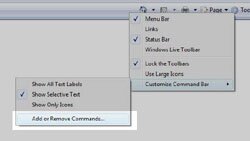
Customize Toolbar window is shown to allow you add or remove button on your IE toolbar. Choose Flash2X Flash Hunter from the left column and click on Add button to put it in the right column as the following screenshot shows.

-
How to setup proxy server settings?
Flash2X Flash Hunter automatically applies proxy settings of Internet Explorer. You do not need to set proxy servers for it separately.
-
How to save flash movies and Youtube videos in frames?
To save flash and download Youtube videos in frames you must launch Flash2X Flash Hunter from Internet Explorer popup menu by choose Download Flash Movies as the following screenshot shows.

-
I can not save any flash movies or Youtube videos on my computer, what to do?
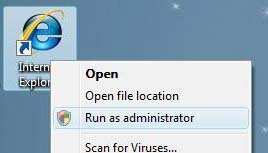
If you are running Windows Vista and with User Account Control (UAC) on, you must run Internet Explorer as administrator by right clicking on Internet Explorer icon, and choose Run as Administrator option as the following screenshot shows.